A warm light in a cold cloud

A free, private AI that lives on your own computer.

Ask it anything — dinner ideas, tricky emails, homework help. No account, no monthly fee, and nothing you say ever leaves your machine.

Works right in your browser — nothing to install. Mac, Windows & Linux apps are on the way.

$0
forever — no subscription, no caps
100%
private — nothing leaves your device
1
download — then it works without internet, forever
Hearth ✈ Wifi off — still working
What can I make with chicken, rice and a bell pepper?

Easy — one-pan chicken & pepper rice. Sear the chicken, soften the pepper, stir in the rice and broth, lid on for 15 minutes. Dinner in under 30.

Wait — did anyone else just see that?

Nobody. I run right here on your computer — nothing you say ever leaves this machine. 🔒

Say something to Hearth…

The opposite of the cloud

An AI that's actually yours.

Every other AI lives in someone else's data center — metered, logged, one outage from gone. Hearth is the other thing entirely.

Private by nature

Every word stays on your machine. No servers, no logs, no one reading over your shoulder. Privacy isn't a setting — it's how Hearth is built.

Free & unlimited

No subscription. No message caps. No meter ticking. Hearth runs on your own hardware, so there's simply nothing to bill.

Works without internet

On a plane, in a cabin, when the wifi dies. Once it's set up, Hearth needs the internet about as much as a candle does.

Truly yours

No account, no login, no tracking. Hearth is an app that lives with you — not a service you rent.

The question everyone asks

“So how is this different from ChatGPT?”

Simple: ChatGPT runs in a giant data center you rent. Hearth runs on your own computer. That one difference changes everything below.

🔥 HearthCloud AI (ChatGPT, Gemini)
PriceFree, forever~$20/month for the good stuff
PrivacyEverything stays on your deviceYour chats live on their servers
Works without internetYes — even on a planeNo internet, no AI
Account neededNone. Just open it.Sign-up required
Huge, complex projectsHonestly? Not its thingThe cloud wins here

That last row is on purpose. Hearth isn't trying to replace the giants — it's the everyday AI that's actually yours.

See the full Hearth vs ChatGPT comparison →

Warm sunset glowing through an airplane window
On the plane — no wifi, no problem.
A cozy wooden cabin in a snowy forest
At the cabin, off the grid.
Someone kneading dough by warm window light in a rustic kitchen
"What can I make with what's in the fridge?"

Why now

Cloud AI is cheap today because
someone else is footing the bill.

Right now the big AI companies are racing for users, so prices feel low and limits feel generous. That never lasts. Subscriptions creep up, free tiers shrink, meters appear — and access can be throttled, repriced, or switched off overnight. Hearth's price can't move. It runs on a computer you already own — so it's free today, and free in ten years.

$0 — forever No meter, ever Can't be throttled or cut off
Bring your AI home — free →

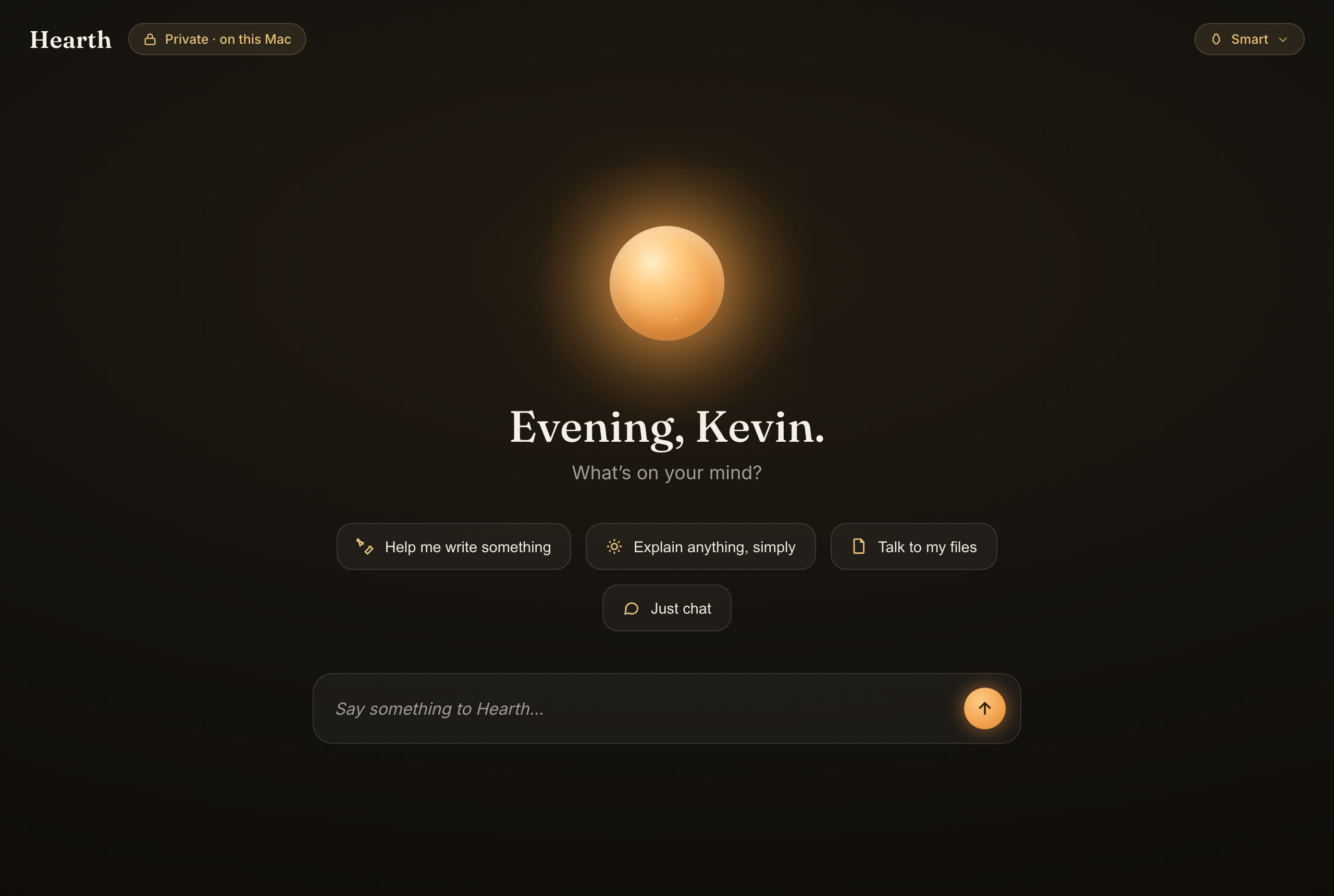
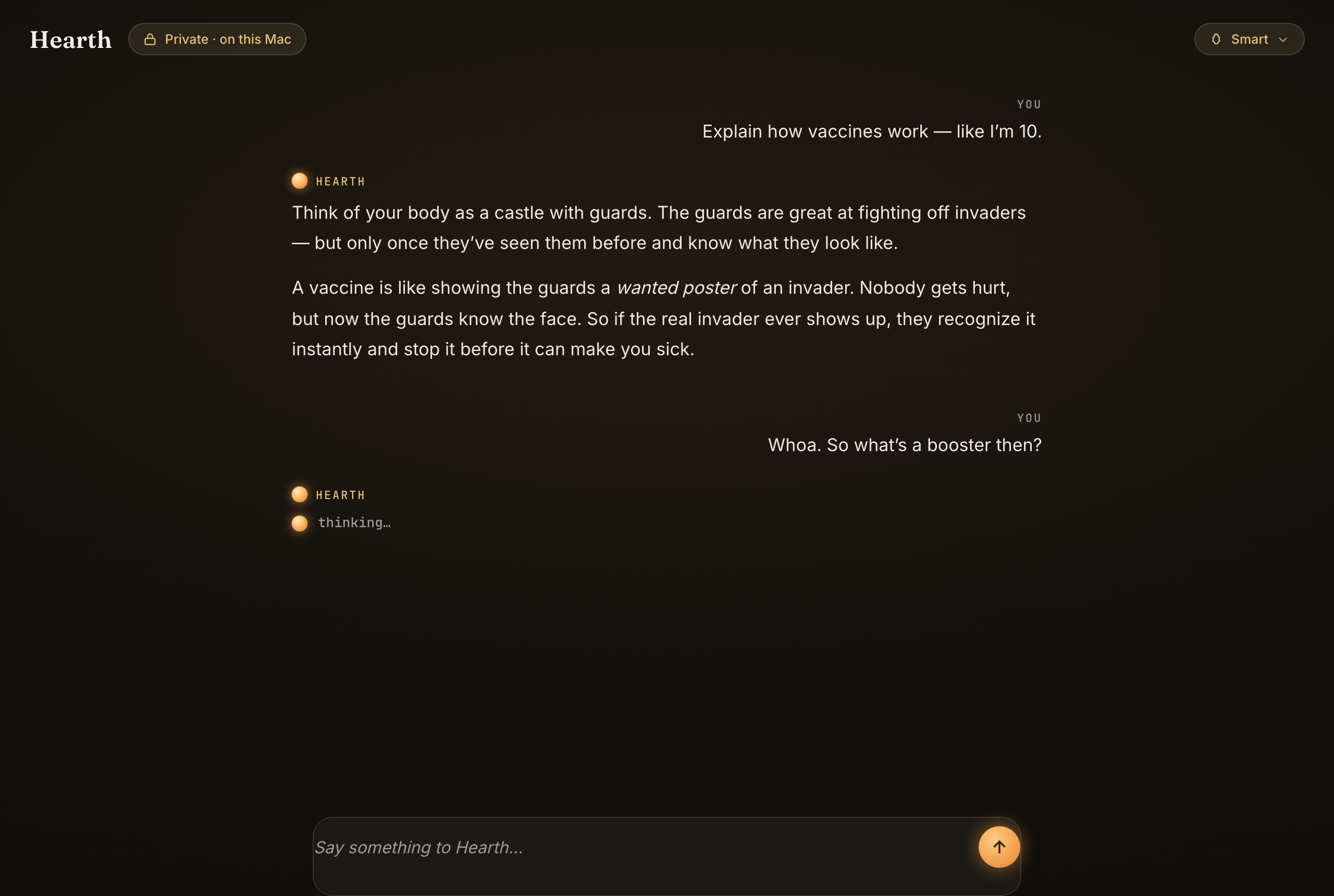
Beautiful enough to want open

Most AI looks like a cockpit. Hearth looks like a warm room.

Hearth home screen at night

The ember, waiting by the fire.

Hearth conversation at night

A conversation that reads like a letter.

Three steps, no jargon

From download to talking in a minute.

1

Open it

In your browser, or as a one-file app — no setup, no terminal, no account. It just opens, with an AI already waiting inside.

2

It picks your brain

Hearth checks your computer and quietly loads the right model — Fast, Smart, or Genius. You don't choose jargon; you choose how clever you want it.

3

Start talking

Ask anything. The answer arrives in seconds — entirely offline, entirely private. Often before a cloud app would've finished loading.

Why this exists

The cloud was never yours. Your AI shouldn't live in someone else's data center — metered, logged, and one outage from gone. Hearth brings it home: warm, private, and yours. A light you own, in a cloud you don't.

Everything it does

The whole feature list. All of it free.

💬

Just talk

Ask anything, get plain answers — recipes, emails, ideas, explanations, brainstorms.

📷

Show it photos

Attach a picture and ask about it. The photo never leaves your device.

🧠

Three brains

Fast, Smart, or Genius — it checks what your computer can handle and tells you, in plain words.

💾

Remembers your chats

Conversations save on your device only — never uploaded. Pick up right where you left off.

✈️

No internet needed

After the one-time download, it works anywhere — plane, cabin, dead wifi.

⬇️

Lives in your Dock

Install it like a real app, straight from the browser. No app store.

🖨️

Copy & print

Take any answer with you — beautifully formatted, one click.

🔓

No account, ever

No sign-up, no email, no tracking. Open it and start talking.

That's the whole product. No locked buttons, no “Pro” tier, no upsell coming later. All of it free — because it runs on your computer, not on ours.

A few honest details

"On your device, ~1 GB, best in Chrome." Here's what that means.

🏠 It lives on your computer

The thinking happens right on your own machine — not on a faraway company's server. That's why it's private, and why it keeps working with the internet switched off. It's your AI, like any other app on your computer.

📦 Why the one-time download

You're bringing the whole "brain" home once — instead of borrowing it over the internet every time you ask something. Think of downloading a movie for a flight instead of streaming it: the first load is big, then it's instant forever, even offline.

🧭 Why Chrome or Edge

To think quickly, Hearth uses your computer's graphics chip — the same part that makes games and video look smooth. Today, Chrome and Edge let it do that; Safari and Firefox are catching up. So for the smoothest ride right now, open it in Chrome or Edge.

The only catch — and we'll name it ourselves: your first visit downloads Hearth's brain. A few minutes, one time. That is the entire price — no money, no account, no fine print. Like downloading a movie before a flight: once it's home, it's yours. Put plainly: a few minutes from now, you own an AI.

“Will it run on my computer?”

One honest requirement: Hearth borrows your computer's own power to think. Newer machines fly; a ten-year-old laptop will probably struggle. Not sure where yours lands? Check it — one click, one second:

The check happens right in your browser. Nothing is sent anywhere — of course.

Kevin Champlin, the engineer who built Hearth

A note from the builder

“The big AI companies rent you a seat in their data center. I'm an AI engineer — I wanted to hand you the keys instead. Hearth is what I believe everyday AI should be: beautiful, private, and yours. No investors behind it, no data to sell, no catch. It's signed work.”

Kevin Champlin, engineer & AI specialist · kevinchamplin.com · read every line on GitHub

“Okay… but why give it away?”

For the curious. A lot of people are AI-curious but not ready to hand a credit card — and their conversations — to a tech giant. There should be a free, safe first seat at the fire. This is it.
For the love of it. I'm an engineer. I love technology, I love AI, and I love building things. Hearth is the thing I make because I can't not make it.
Because it was missing. Beautiful, private AI for everyday people simply didn't exist — local AI was for tinkerers with terminals. That hole bugged me. So I filled it.

And what's in it for me? My name on work I'm proud of — that's the whole trade. More on the why, and the name →

Bring it home.

Free, forever. Start in your browser — or keep it as an app.

Try it right in your browser

No app to install — just open Hearth in Chrome. It downloads the AI once — a few minutes, just the first time — then it's instant and works without internet. Everything runs inside your tab, completely private.

Launch in Chrome ✓ Live now

Or keep it forever as a native app

macOS Coming soon
Windows Coming soon
Linux Coming soon

Keep it forever: install it like a real app

Hearth can live in your Dock or taskbar — no app store needed. Pick your browser and we'll point right at the button.

  1. Open Hearth in Chrome and light the fire.
  2. Look at the right end of the address bar for a small install icon — a little screen with a down-arrow.
  3. Click it, then Install. Done — Hearth now opens from your Dock (Mac) or Start menu (Windows), in its own window.

Don't see the icon? Click the ⋮ menu in Chrome's top corner → Cast, save and shareInstall page as app… — or just use the ⬇ Install button inside Hearth itself.

  1. Open Hearth in Microsoft Edge.
  2. Click the ⋯ menu in the top-right corner.
  3. Choose AppsInstall Hearth. It now opens from your Start menu like any other app.

Edge may also show a small install icon at the right end of the address bar — one click does the same thing.

  1. Open Hearth in Safari.
  2. Click File in the menu bar at the top of your screen.
  3. Choose Add to Dock… and click Add.

Honest heads-up: Hearth runs smoothest in Chrome or Edge today — Safari is still catching up on the technology Hearth uses to think fast.

  1. iPhone & iPad: open Hearth in Safari, tap the Share button (the square with an arrow), then Add to Home Screen.
  2. Android: open Hearth in Chrome, tap the ⋮ menu, then Add to Home screen (or Install app).

Honest heads-up: phones are still experimental for Hearth — newer phones with plenty of memory handle the Fast brain; older ones may struggle. A computer is the best seat by the fire for now.

The browser version is live now — the Mac, Windows & Linux apps are in active, in-the-open development. Star it on GitHub to follow along.

When someone asks what it is:“It's a free AI that runs on your own computer — it even works with the wifi off.”

From the blog

Private AI, in plain English.

All posts →
Jul 6, 2026 · 2 min read
Understanding On-Device AI: Your Data's Private Home
Learn how AI running on your device ensures privacy and control, making your data truly yours without relying on external servers.
Read →
Jul 5, 2026 · 2 min read
Using Your Voice to Chat Privately with AI on Your Own Device
Discover how to talk to AI using just your voice while keeping your conversations private and offline, with no account needed.
Read →
Jul 4, 2026 · 2 min read
Five Everyday Tasks Your Local AI Excels At
Discover five practical tasks that a free local AI can help you with, privately and offline, enhancing your daily life seamlessly.
Read →

Try Hearth free →